NGS Data Analysis for Beginners: The Pipeline, Tools and First Commands
By Dr. Tamanna Anwar, PhD, Founder, Centre of Bioinformatics Research and Technology (CBIRT)
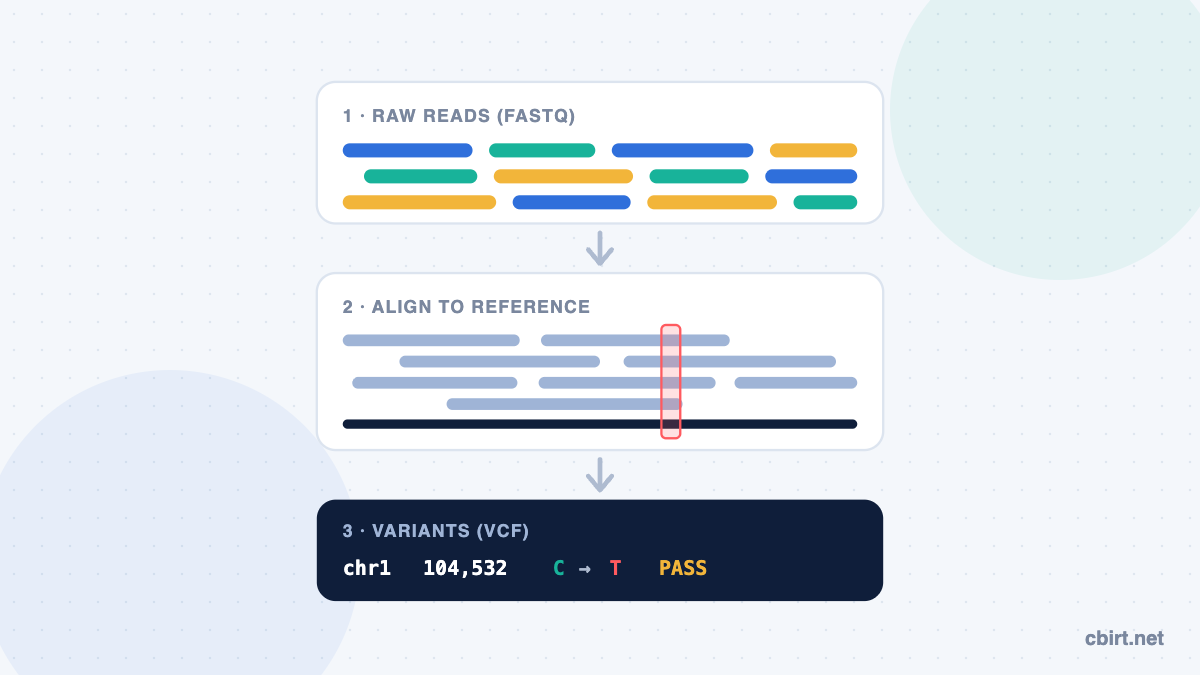
A sequencing machine does not give you an answer. It gives you millions of short DNA fragments, called reads, each with a quality score. NGS data analysis is the work of turning those reads into something you can interpret: a list of genetic variants, a table of gene expression, or a finished genome.
This guide walks through that process step by step, using the standard tools at each stage. Each step includes a starter command, so you can see what the work actually looks like rather than just reading about it.
What is NGS data analysis?
Next-generation sequencing (NGS) reads DNA or RNA in massively parallel batches. Analysis usually follows the same backbone, whatever the experiment:
- Check quality of the raw reads.
- Clean them by trimming adapters and low-quality ends.
- Align them to a reference genome.
- Process the alignments: sort, index and mark duplicates.
- Extract the result: call variants for DNA, or count reads per gene for RNA.
- Annotate and interpret what the result means biologically.
Whole-genome sequencing (WGS), exome sequencing (WES) and RNA-seq share the first three steps and differ mainly in what comes after alignment.
The NGS pipeline at a glance
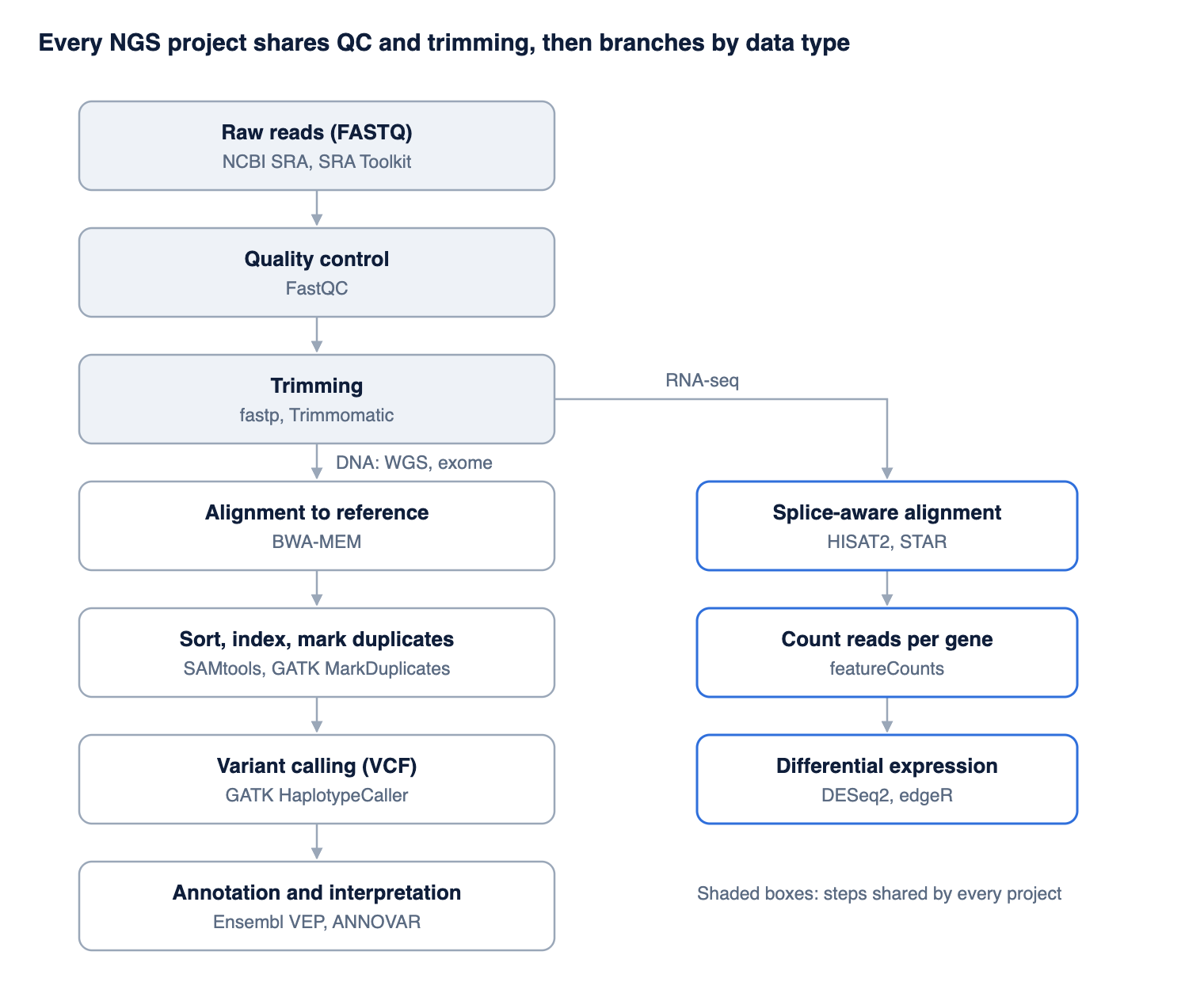
Quality control and trimming are the same for every project; after that, DNA projects go to variant calling and RNA-seq projects go to gene counting.
Step by step: from FASTQ to variants
The commands below are for a paired-end DNA sample (sample_R1.fastq.gz, sample_R2.fastq.gz) and a reference genome (ref.fa), run on Linux. They are a starting point to understand the flow, not a production pipeline.
Step 0: Get the data
Public data lives in NCBI’s Sequence Read Archive (SRA). The SRA Toolkit converts a run to FASTQ:
fasterq-dump --split-files SRR11180057
Step 1: Quality control
A FASTQ file stores each read’s sequence and a quality score for every base. Scores use the Phred scale: Q30 means a 1 in 1,000 chance that a base is wrong (99.9% accuracy). FastQC summarizes quality across all reads.
fastqc sample_R1.fastq.gz sample_R2.fastq.gz
Look at per-base quality, adapter content and duplication levels in the HTML report.
Step 2: Trimming
Remove adapter sequences and low-quality ends. fastp and Trimmomatic are common choices.
fastp -i sample_R1.fastq.gz -I sample_R2.fastq.gz \
      -o trimmed_R1.fastq.gz -O trimmed_R2.fastq.gz
Step 3: Alignment
Map each read to its position on the reference genome. BWA-MEM is standard for DNA; HISAT2 or STAR are used for RNA-seq because they handle splicing.
bwa index ref.fa
bwa mem -R '@RG\tID:s1\tSM:sample1' ref.fa trimmed_R1.fastq.gz trimmed_R2.fastq.gz > sample.sam
The -R read-group tag is required later by GATK.
Step 4: Sort, index and mark duplicates
The output is a SAM file; convert it to a sorted, indexed BAM and flag PCR duplicates so they are not counted as independent evidence.
samtools sort -o sample.sorted.bam sample.sam
samtools index sample.sorted.bam
gatk MarkDuplicates -I sample.sorted.bam -O sample.dedup.bam -M dup_metrics.txt
samtools index sample.dedup.bam
The GATK Best Practices from the Broad Institute also recommend base quality score recalibration (BQSR) at this stage for human data.
Step 5: Variant calling
Find positions where the sample differs from the reference. GATK HaplotypeCaller is widely used; FreeBayes and bcftools are alternatives.
samtools faidx ref.fa
gatk CreateSequenceDictionary -R ref.fa
gatk HaplotypeCaller -R ref.fa -I sample.dedup.bam -O sample.vcf.gz
The result is a VCF file: one line per variant, with its position, the reference and alternate alleles, and quality.
Step 6: Annotation and interpretation
A VCF says where variants are, not what they do. Annotation tools such as Ensembl VEP and ANNOVAR add the affected gene, the predicted effect on the protein and population frequencies. Interpretation then depends on your question: a disease study, a crop trait, or a pathogen outbreak.
The RNA-seq branch
For gene expression, steps 1–2 are the same. Reads are aligned with a splice-aware aligner (HISAT2 or STAR), counted per gene (featureCounts), and compared between conditions in R with DESeq2 or edgeR.
What you need to start
| Need | Beginner setup | Why |
|---|---|---|
| Operating system | Linux, or Windows with WSL (Windows Subsystem for Linux) | Nearly every NGS tool is built for the Linux command line |
| Tool installation | Conda with the Bioconda channel | Installs FastQC, BWA, SAMtools, GATK and others without manual compiling |
| Practice data | A small bacterial or viral sample from NCBI SRA | Runs on a laptop in minutes instead of days |
| Bigger projects | A university server or cloud machine | Human whole-genome data needs far more memory and storage than a laptop has |
| No coding yet? | Galaxy, a free web platform | Lets you run the same tools through a browser while you learn the concepts |
Common beginner mistakes
- Skipping quality control. Bad reads in, bad variants out. Always read the FastQC report before moving on.
- Mixing reference versions. Aligning to one genome build (for example GRCh38) and annotating with another (GRCh37) silently gives wrong positions.
- Forgetting read groups. GATK tools stop with an error if reads have no read-group tag.
- Treating every variant as real. Raw calls include errors; filter by quality and depth before interpreting.
- Starting with human WGS. Learn the full flow on a small genome first, then scale up. Project 4 in our list of bioinformatics projects is a good place to start.
Learn NGS data analysis live with CBIRT
CBIRT’s NGS Data Analysis program takes you through this pipeline on real public data, in live online sessions with experienced trainers. It is an industry-focused skill development program: you run each step yourself, ask questions as you get stuck, finish with an assignment or project, and receive a certificate on completion.
Next batch: 3–17 November 2026. See dates, fees and registration →
New to the field? Start with what bioinformatics is, or compare options in our guide to bioinformatics courses in India.
Frequently asked questions
What is NGS data analysis?
It is the process of turning raw sequencing reads into biological results: quality control, trimming, alignment to a reference, and then variant calling or gene-expression counting, followed by interpretation.
Which tools are used for NGS data analysis?
Common ones are FastQC for quality control, fastp or Trimmomatic for trimming, BWA or HISAT2 for alignment, SAMtools for processing alignments, GATK for variant calling, and VEP or ANNOVAR for annotation.
Do I need coding to analyze NGS data?
Basic Linux command-line skills are enough to run a standard pipeline. Python or R helps for downstream analysis and plots. Galaxy lets you start without coding.
Can I do NGS analysis on a laptop?
Yes, for small genomes and practice datasets. Human whole-genome data needs a server or cloud machine.
What is a FASTQ file?
A text file that stores each sequencing read with a quality score for every base. It is the usual starting point of NGS analysis.
What is the difference between WGS and RNA-seq analysis?
WGS looks for differences in the DNA (variants); RNA-seq measures which genes are active and how strongly. Both start with the same quality control and trimming.
Sources
- Babraham Bioinformatics: FastQC
- Illumina: Sequencing quality scores
- Broad Institute: GATK data pre-processing for variant discovery
- NCBI: Downloading SRA data
Related reading on CBIRT: Bioinformatics databases and tools · Bioinformatics internship in India · R vs Python for bioinformatics · Bioinformatics projects for your portfolio · Bioinformatics jobs for freshers